Quilt Direct
OVERVIEW
A specialist retail experience, connected to learning
Quilt Direct brings sewing machines, quilting tools, threads, embroidery supplies and practical education into one specialist retail destination. The case study focuses on a Shopify storefront that helps customers move from inspiration to product discovery, then into classes, tuition and events. The project brief identifies Shopify development and a custom event calendar as the core scope. This document combines that supplied scope with a review of the public website. The live experience confirms dated event listings, class categories and detailed event pages; a separate month-view calendar and its administration were not independently verified. The central design opportunity is to make a broad catalogue feel approachable while giving learning experiences the same clarity as physical products. The resulting case-study narrative is about connected discovery, specialist guidance and clear next steps.
CHALLENGE
Make a wide catalogue and a busy learning programme easy to explore
A specialist shopper may arrive with a brand in mind, a project to complete, a machine to compare or a skill to develop. These intentions require different discovery routes. A single undifferentiated product feed would place too much work on the visitor. Events introduce another layer of decision-making: customers need dates, timing, location, price, suitability and availability before choosing a course. Sold-out sessions also need a useful next step. The design must support this information without making the retail experience feel fragmented. The brief therefore calls for a coherent Shopify experience: strong catalogue navigation, consistent product presentation and an event discovery layer that connects learning with the wider store.
OUR APPROACH
Organise around customer intent
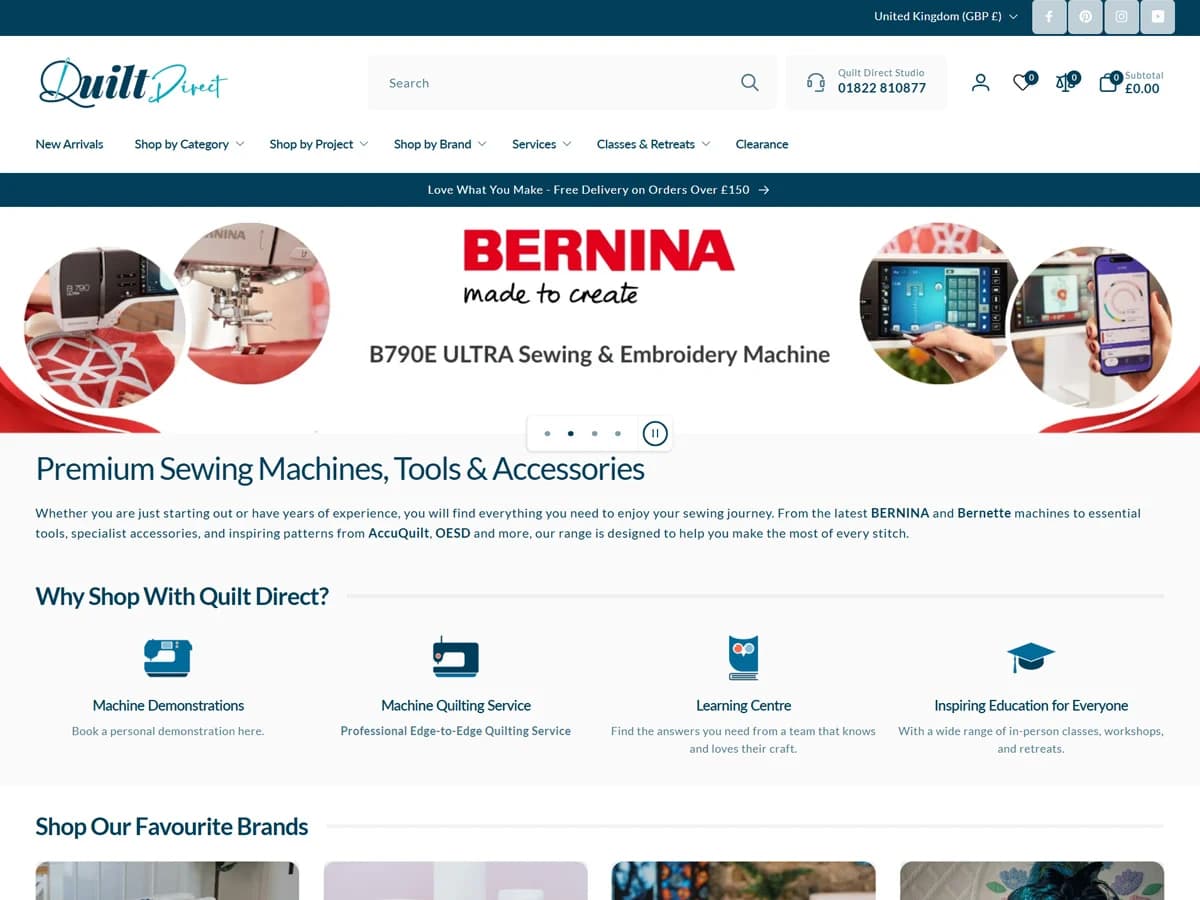
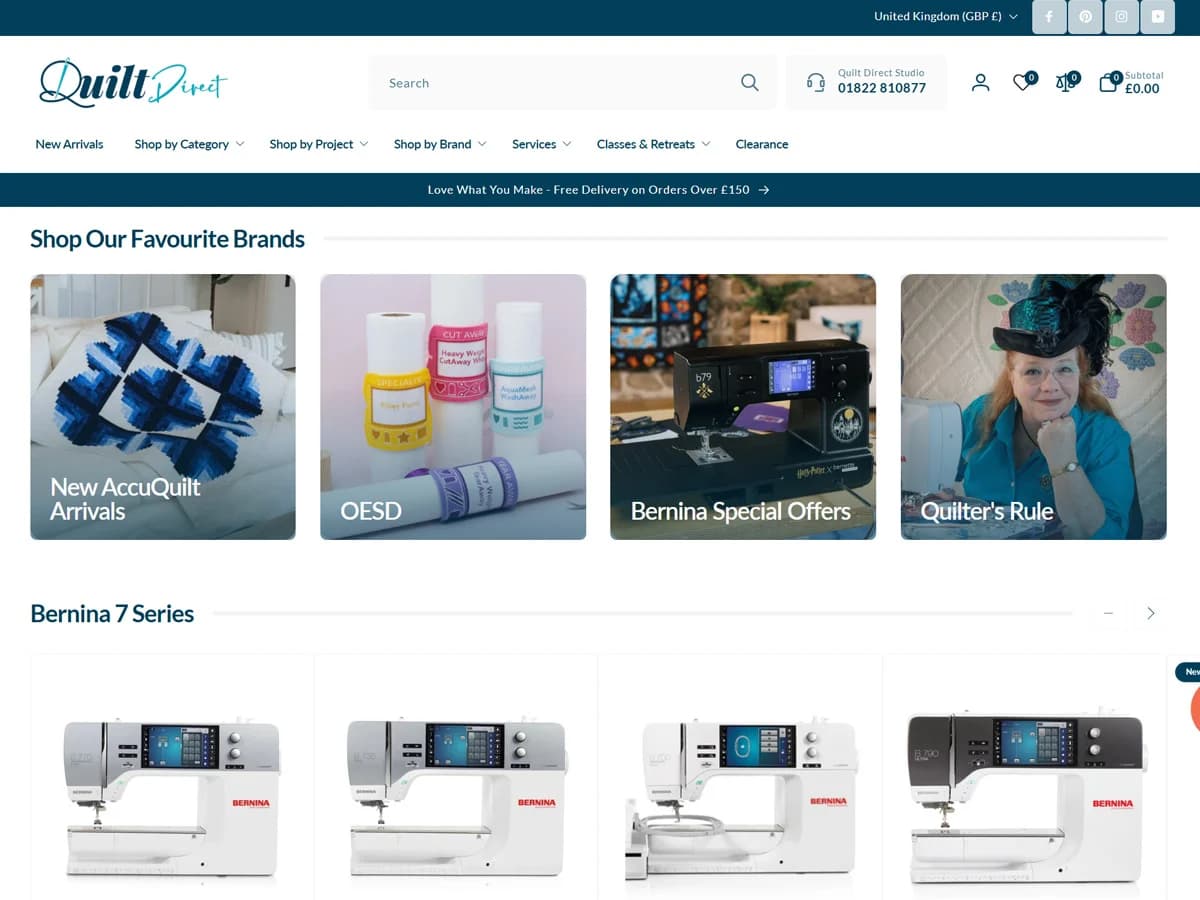
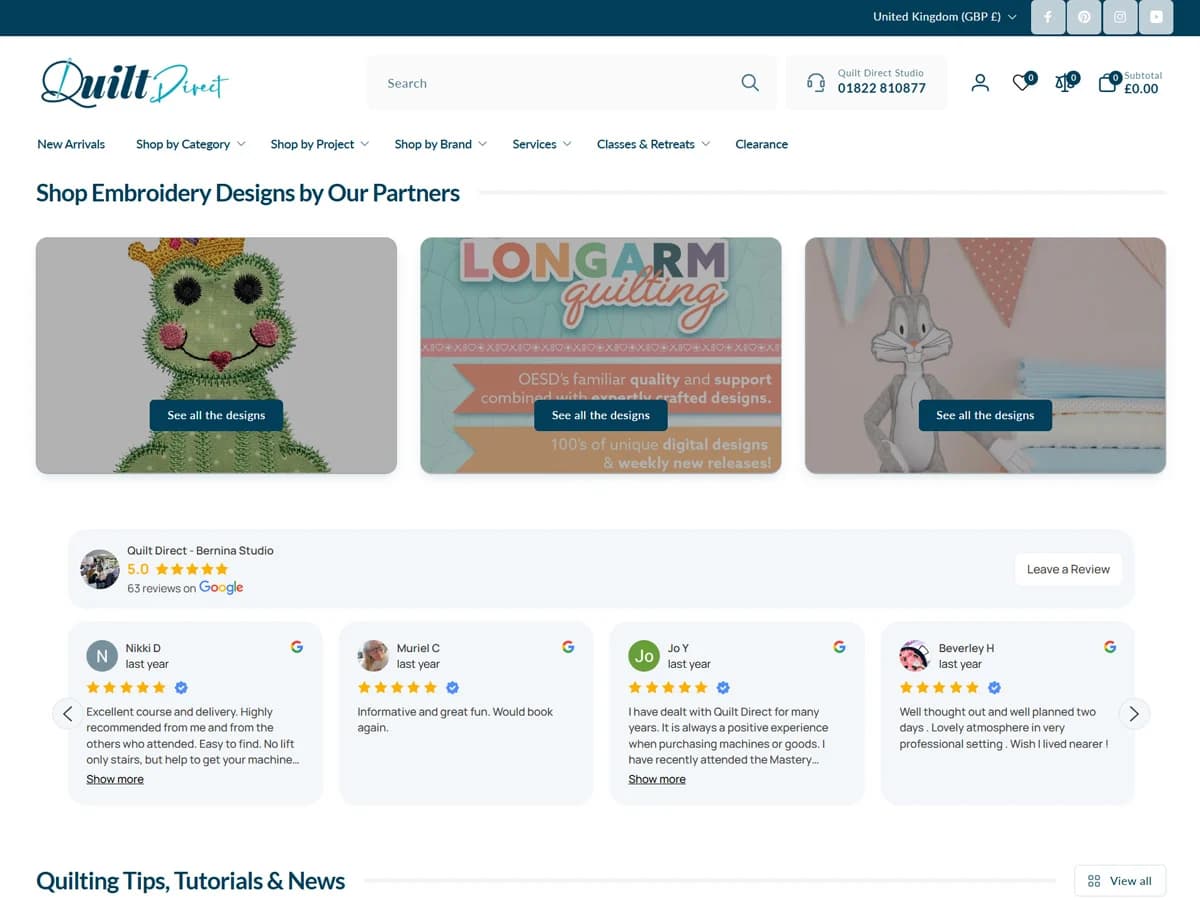
The visible navigation supports shopping by category, project and brand, with separate routes into services, classes and retreats. This structure lets customers start from the language they already use rather than requiring them to understand an internal catalogue. The homepage combines product-led promotional imagery with service and learning content. Machine demonstrations, quilting services and education give the store a specialist context, while collection links create practical entry points into the range. For learning, the journey moves from a broad classes overview into a dated event collection and an individual course page. Each stage narrows the decision: choose an area of interest, inspect a session, then review the practical requirements and availability.
DESIGN
A familiar specialist brand in a clear shopping interface
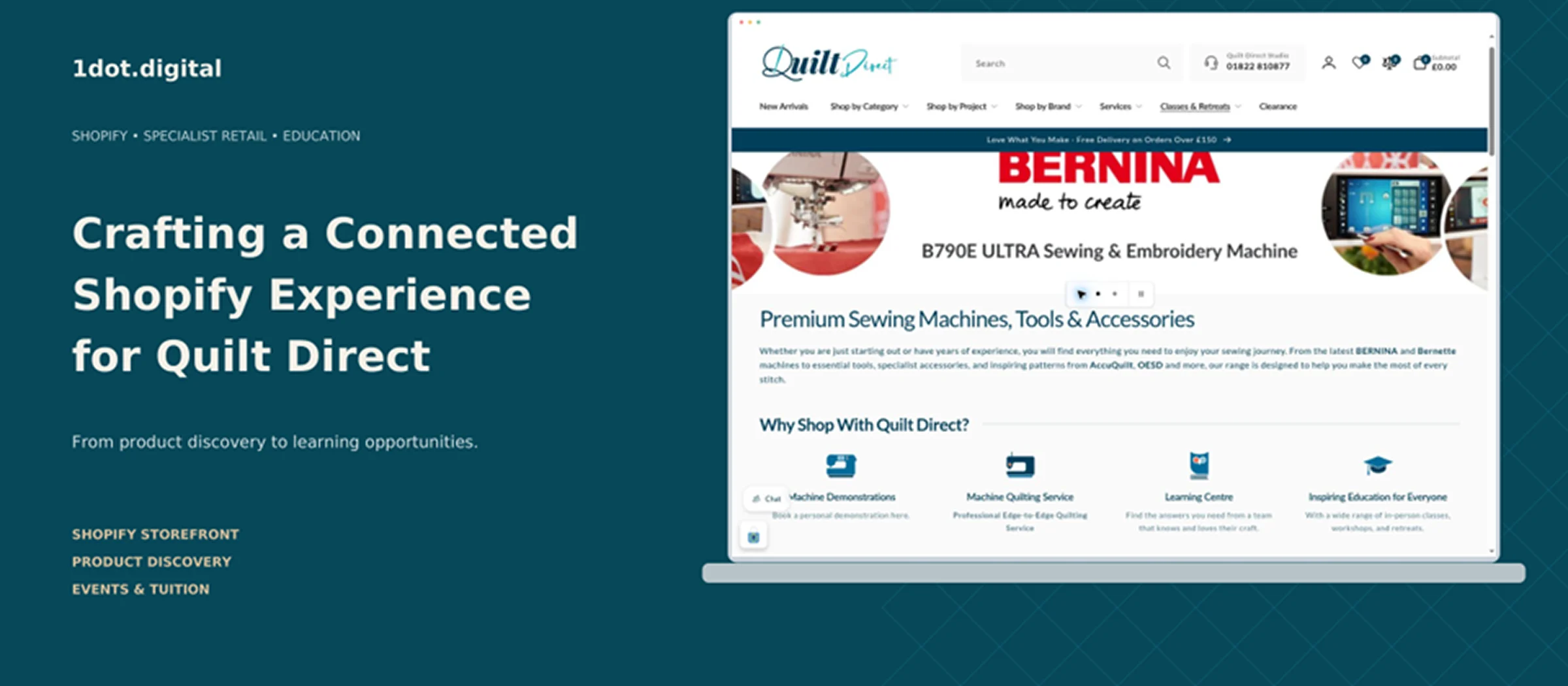
The storefront uses a distinctive script logo, deep teal navigation bars and generous white surfaces. Large product photography supplies colour and context; restrained interface styling keeps controls and information readable. A prominent search field sits alongside the studio contact number and account, wishlist, comparison and basket controls. Category navigation remains visually separate from the promotional banner, helping customers recognise the main discovery tools quickly. Class category imagery introduces the educational offer before visitors encounter individual sessions. Event cards use date labels, prices and availability cues to make the schedule easier to scan. The course page then uses a large image beside the title, price and practical event information. The presentation design in this case study follows the supplied reference: navy headings, cobalt accents, rounded screenshot frames, compact feature cards and a narrow section index. The hero uses warm cream typography against a deep teal background, with the original storefront captured inside a device frame.
DEVELOPMENT
Shopify foundations for commerce and education
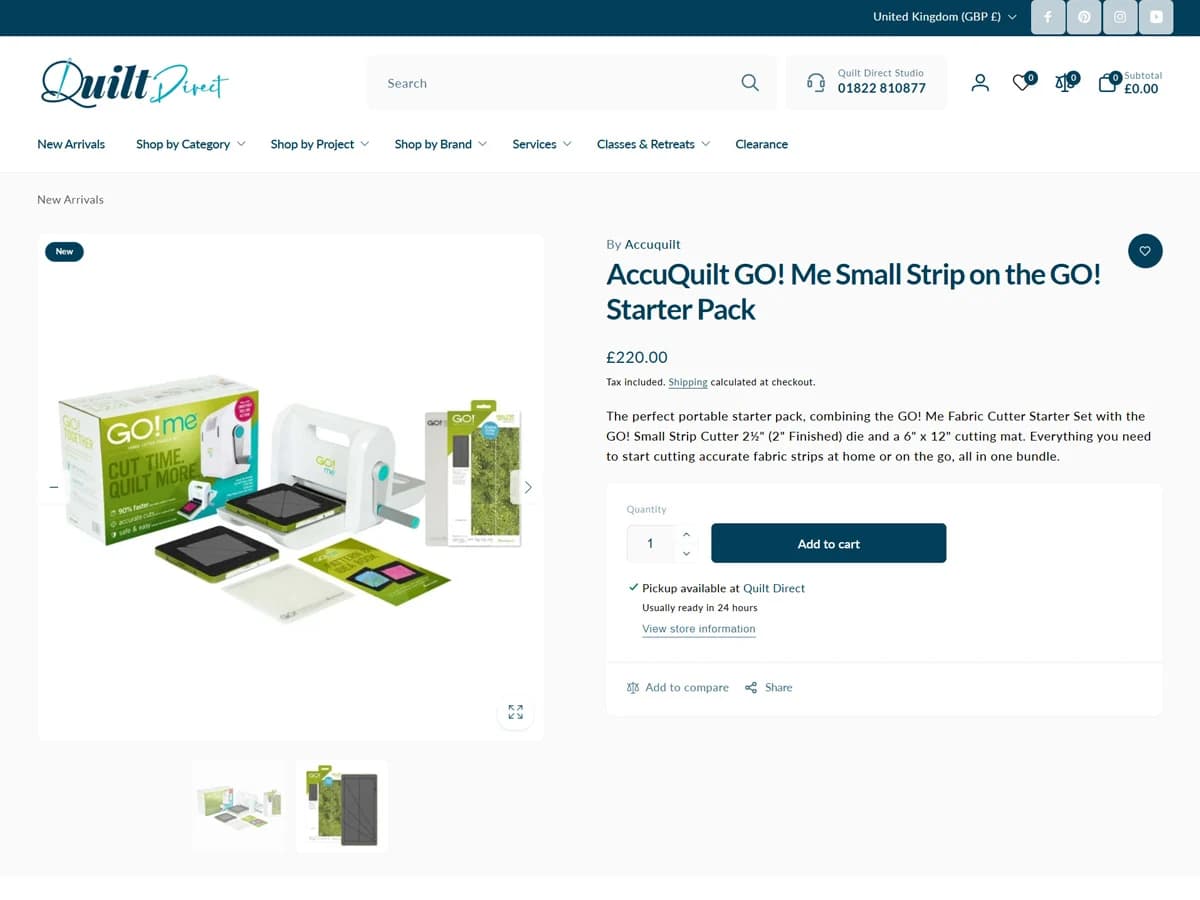
The public footer identifies Shopify as the commerce platform. The visible storefront includes collection browsing, product pages, search, price and brand filtering, sorting, quantity controls and product availability states. These are observable interface features, not evidence of a particular custom code architecture. Events are presented through product-style pages. The reviewed Bernina Mastery Sewing session displays the course price, dates, daily times and venue. It also asks for the machine being brought, skill level, dietary requirements and additional information, supporting the practical needs of an in-person course. The reviewed session is sold out and offers an event waitlist action. Its description links to an alternative session and includes supporting course information. This gives the visitor context beyond a simple unavailable state. No checkout, payment, waitlist submission or backend workflow was tested. Theme provenance, app ownership, integration details, accessibility compliance and performance scores require project access or further technical verification.
CUSTOM EVENT CALENDAR
Bring the learning programme into the shopping journey
The custom event calendar is a project requirement supplied in the brief. Its purpose is to make upcoming learning opportunities easier to find and connect the schedule to the information needed to choose a session. The public experience provides dated cards within an All Events collection and a classes overview organised by learning category. A date-led presentation helps visitors distinguish sessions, while event detail pages carry timing, location, price and availability. The observed journey is: explore classes or events, identify a suitable dated session, review the course information, and act on its availability. For an available session, the commercial action can be assessed on the relevant page; for the reviewed sold-out session, a waitlist and an alternative date are visible. A month grid, date-range filters, recurring-event logic, capacity synchronisation and an administrative calendar were not visible or tested. These should only be described as implemented features after confirmation from the project team. They are not assumed in this case study.
ON-PAGE SEO
Clear language for products, learning and intent
The homepage has a descriptive title, a category-focused meta description and a canonical URL. Its main heading communicates the core retail offer: premium sewing machines, tools and accessories. These are useful foundations for search discovery and page comprehension. The recommended case-study copy targets Shopify development, quilting ecommerce and custom event calendar intent naturally through headings and descriptive paragraphs. Event titles should identify the course and date, with the venue, suitability and practical details clearly expressed in visible content. For ongoing optimisation, review collection introductions, internal links between supplies and related classes, image alternative text, expired-event handling and structured data eligibility. Product or event markup must match the page and implementation; no rich-result eligibility or ranking improvement is claimed here
RESULTS
The reviewed website offers multiple routes into a specialist catalogue and presents learning as part of the same brand experience. Dated event cards lead into course pages with practical information, helping visitors assess both the session and its availability. The observable outcomes are a clear catalogue hierarchy, prominent search, integrated education pathways and detailed event presentation. These support a coherent customer journey from shopping interest to learning intent. Commercial impact has not been supplied. Revenue growth, conversion uplift, search traffic gains, booking improvements and performance improvements are therefore not quantified. To complete a measured results section, compare agreed pre-launch and post-launch periods using store analytics, search reporting and event-booking data.
CLOSING
Specialist commerce with room to learn
Quilt Direct demonstrates how a specialist Shopify store can connect tools, machines and materials with the knowledge needed to use them. The case study centres on purposeful navigation, visual clarity and an event journey that keeps practical course information close to the decision. The strongest next step is to confirm the custom calendar implementation and add approved project evidence: delivery scope, launch date, screenshots of the calendar itself and measured outcomes. The current document remains ready to use as a fact-conscious editorial and design foundation.
DESIGN OVERVIEW
Visual system and layout specification
Case-study palette: navy #102D46 for headings and the footer; cobalt #2667E8 for labels and navigation accents; pale grey #F5F7FB for page surfaces; white for cards. The hero adds deep teal #07485A and warm cream #F5F1E9 to connect the presentation with the storefront. Typography: a clean sans-serif family with bold editorial headings and comfortable body text. Hierarchy progresses from a large project title to section labels, descriptive headings and short paragraphs. Body copy is kept in a narrow reading column beside a compact section index. Image system: original desktop screenshots are placed inside rounded browser or laptop frames. The 2400 × 1050 hero introduces the retail experience; the 1200 × 900 secondary visual pairs event discovery with event detail. Screenshot content is preserved, with no fabricated calendar interface. Layout system: a slim agency-style header; introduction and metadata; wide hero; three feature cards; indexed narrative sections; contextual screenshots; a dark closing panel and source notes. Decorative graphics stay outside the original screenshots.
SEO PUBLISHING PACK
Ready-to-use case-study metadata
Meta title: Quilt Direct Shopify & Event Calendar Case Study Meta description: Explore Quilt Direct’s Shopify storefront, product discovery and event experience, with a detailed case study and design overview for specialist retail. Suggested URL slug: /case-studies/quilt-direct-shopify-event-calendar Primary topic: Quilt Direct Shopify development. Supporting topics: quilting ecommerce, custom event calendar, classes and tuition, product discovery, Shopify case study. Hero alt text: Quilt Direct homepage shown in a laptop-style frame beside the case-study title. Secondary alt text: Original Quilt Direct event listing and course detail screenshots in browser frames. Publishing note: retain the verification note until calendar scope and delivery ownership are confirmed. Do not present recommendations as completed work or add unverified commercial results.
Have a similar challenge?
Tell us your platform and goal. We'll show you how this approach would apply to your store.