
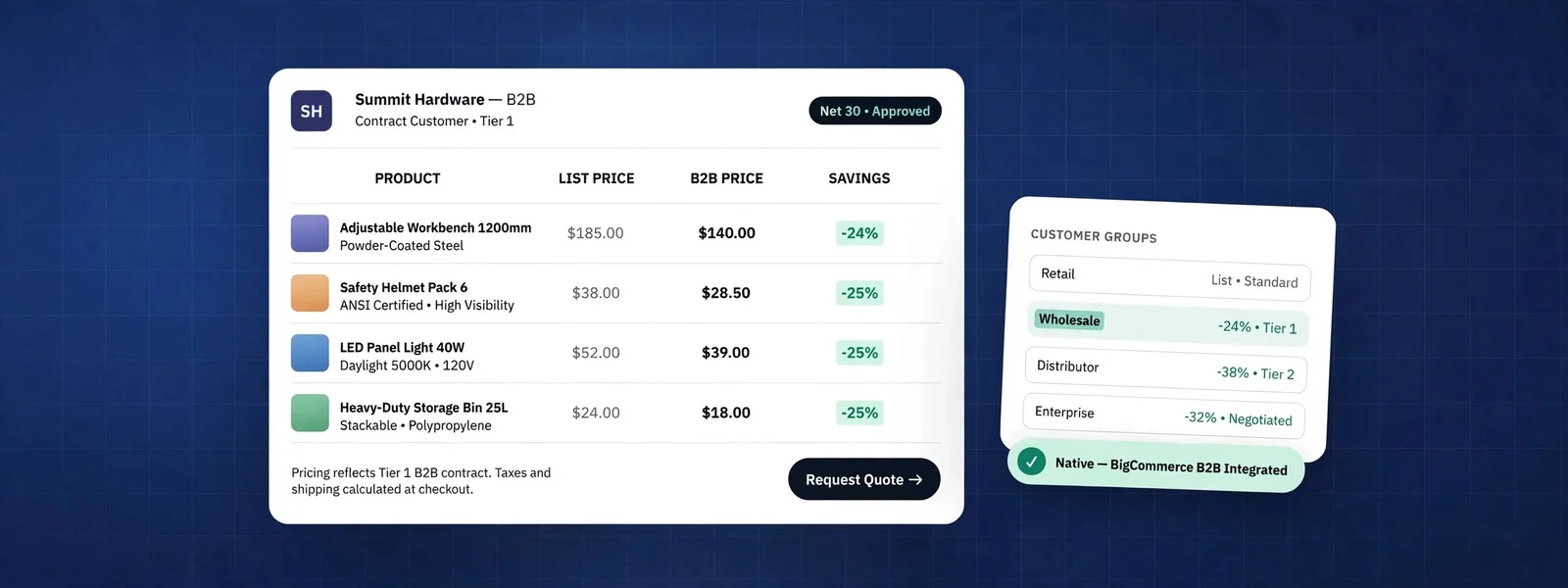
BigCommerce B2B selling rests on two native features that do most of the work: customer groups, which decide who sees what and at what discount, and price lists, which give each group its own prices down to the variant. Add B2B Edition and you get company accounts, quotes, purchase orders and invoices. For many wholesale and trade businesses that combination is enough, and for some it fits better than Shopify Plus. This article explains where the line falls, based on the B2B stores we have built and migrated.
What “B2B” actually needs to mean for your store
Before comparing platforms, pin down what your trade customers expect, because “B2B” covers very different businesses. In our projects the requirements usually come from this list:
- Different prices for different buyers: trade vs retail, tiered by volume, or negotiated per account.
- Restricted catalogs: some products visible only to some customers.
- Company accounts: several buyers under one business, with roles and spending limits.
- Ways to pay that are not a card: purchase orders, net terms, invoices.
- Fast reordering: quick order forms, shopping lists, reorder from history, CSV upload.
- Quotes: buyers asking for a price before they commit.
- ERP integration: prices, stock and customer accounts synced with the system that runs the business.
If you only need the first two, most platforms can handle it. The further down the list you go, the more the choice of platform (and edition) matters.
Customer groups: who sees what
In BigCommerce, every customer can belong to a customer group. Groups control:
- Discounts applied to the whole catalog, specific categories or specific products.
- Which categories the group can see, so a trade-only range can stay hidden from retail shoppers.
- Which price list applies, if you use price lists.
Customer groups are simple to set up and easy for staff to understand, which matters more than it sounds: in our experience, B2B pricing breaks when the people managing accounts cannot see why a customer got a certain price. Keep the number of groups small and meaningful (for example “Trade”, “Distributor”, “Key accounts”) rather than one group per customer.
Price lists: prices per group, down to the variant
Price lists let you set a specific price for each variant for a group of customers, including bulk pricing tiers, instead of applying a percentage discount. That is the difference between “trade gets 20% off” and “this distributor pays these exact prices”, which is what most ERP-driven businesses need. Price lists can be imported and updated in bulk or through the API, which is how we usually keep them in step with an ERP.
Check which BigCommerce plan includes price lists for your volume before you design around them; plan features change, and the current plan comparison on BigCommerce’s site is the only reliable source. [Confirm: price list availability on your plan]
B2B Edition: accounts, quotes, purchase orders
BigCommerce’s B2B Edition adds the features that customer groups and price lists do not cover: company accounts with multiple buyers and roles, a buyer portal, quote requests, purchase orders, invoice management, shopping lists and quick order tools. It is licensed separately from the core platform.
Our view: if you need company accounts, approvals or invoicing, budget for B2B Edition from the start rather than trying to assemble the same thing from separate apps. If you only need group pricing and hidden categories, the core features are often enough and B2B Edition is overhead.
Shopify Plus for B2B: what it offers
Shopify’s B2B features model the business customer as a company with locations, each of which can have its own catalogs (product and price selections), payment terms such as net terms, quantity rules and volume pricing. Buyers log in to the same storefront as retail customers and see their own prices. It is a clean model and it has improved steadily; historically it has been a Shopify Plus feature, so check current plan availability before you rely on it.
Where we see Shopify Plus win: brands that are primarily direct-to-consumer and add a wholesale channel, that want one storefront and one admin, and whose trade pricing is reasonably simple.
BigCommerce vs Shopify Plus for B2B: the comparison
This table reflects how the two platforms compare for the B2B requirements above, from our implementation work. Treat it as a starting point and verify the specifics against each platform’s current documentation.
| Requirement | BigCommerce | Shopify Plus |
|---|---|---|
| Group or company pricing | Customer groups and price lists, down to the variant | Catalogs per company location, volume pricing |
| Hidden trade catalog | Category visibility by customer group | Catalogs control what each company sees |
| Company accounts and buyer roles | B2B Edition | Companies with locations and customer permissions |
| Quotes | B2B Edition | Draft orders; dedicated quote apps |
| Purchase orders and net terms | B2B Edition | Payment terms per company location |
| Payment gateway choice | Many gateways without platform transaction fees | Extra fees on third-party gateways unless you use Shopify Payments |
| Separate wholesale storefront | Multi-storefront from one admin | Usually the same storefront; expansion stores for separation |
| Complex products and options | Flexible options and modifiers | Variant model, with apps for complex configuration |
When BigCommerce beats Shopify Plus
In our experience BigCommerce is the better fit when several of these are true:
- B2B is the main business, not a side channel. Pricing per customer or per group is central, and it comes from an ERP.
- You need separate storefronts, for example a trade site and a retail site, or one per brand, managed from one catalog.
- Products are complex: many options, modifiers that change the price, or configurations that do not map neatly onto variants.
- Payment flexibility matters, because your finance team already has a gateway and terms it wants to keep.
When Shopify Plus is the better call
- Your business is mainly direct-to-consumer and wholesale is a growing second channel.
- Trade pricing is simple: a few catalogs, volume breaks, net terms.
- Your team values Shopify’s app ecosystem, checkout and operational tools more than B2B depth.
If you are still deciding between platforms more broadly, including WooCommerce, our guide to choosing between Shopify, BigCommerce and WooCommerce has a scoring matrix you can use with your team.
Questions to ask in a platform demo
Sales demos show the happy path. These questions, asked with your own examples, show how each platform handles your real pricing and accounts:
- Show me one customer who gets a negotiated price on some products, a group discount on others, and full price on the rest. How does staff see why a price was applied?
- How do you hide a whole product range from retail shoppers, including from search results and sitemaps?
- Can one company have several buyers with different spending limits, and who approves an order over the limit?
- How does a buyer reorder last month’s order, or upload a list of SKUs and quantities?
- How are prices and customer accounts kept in sync with our ERP, and what happens when the sync fails?
- What does each of these cost: plan, B2B add-on, apps, and payment fees on our gateway?
If a demo answers most of these with “there is an app for that”, count the apps and their monthly cost in your comparison. That is a legitimate answer, but it changes the total cost and the number of systems your team has to manage.
Implementation notes from real projects
Start from the pricing model, not the theme
Write down how every customer gets their price today, including exceptions. That document decides whether you need groups, price lists, company accounts or all three. We have seen projects add B2B Edition late because an “exception” turned out to be a third of revenue.
Decide what the ERP owns
Prices, stock, customer accounts and order status each need one system of record. Syncing both ways without a clear owner is the most common source of wrong prices we are asked to fix.
Plan the migration of accounts and history
Trade customers expect their login, addresses and order history to survive a replatform. Map customer groups and price lists before you move data, and redirect old URLs the same way you would for a retail store. Our store migration team follows the process in a redirect map that survives replatforming for exactly this reason.
Test as each type of buyer
Create a test account for every customer group and walk through search, category pages, product pages, cart and checkout. Prices that look right in the admin can still be wrong in a cached category page or a search result.
If you are weighing BigCommerce for a trade or wholesale business, our BigCommerce development team can map your pricing model onto customer groups, price lists and B2B Edition before you commit, and compare it honestly with a Shopify Plus build.