
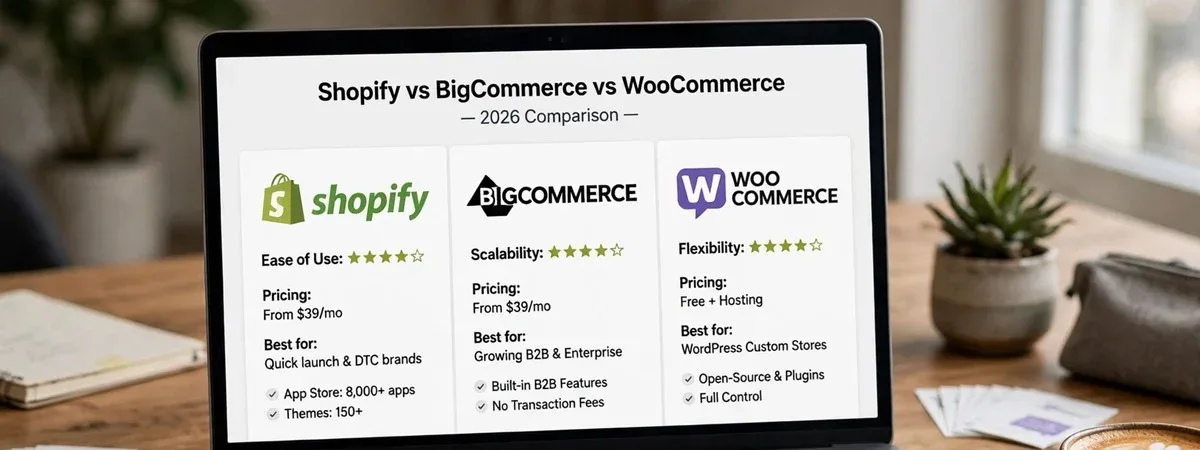
Shopify vs BigCommerce vs WooCommerce is rarely decided by features any more. All three can run a serious store. The choice comes down to four things about your business: the shape of your catalog, how much of your revenue is B2B, how much content you publish, and who will run the store day to day. This guide gives you a framework for those four questions and a scoring matrix to fill in with your team, based on the platform decisions we have made with clients and the migrations we have run between all three.
Start with the business, not the feature list
Feature comparison tables go out of date within months, and every platform can reach almost any feature with an app, an extension or custom code. What does not change quickly is the fit between the platform’s model and how your business works. We ask four questions before anyone opens a pricing page.
1. What does your catalog look like?
- Simple catalogs (hundreds of products, a few variants each) work well on all three.
- Complex products (many options, price-changing modifiers, configurable bundles) favour platforms with a flexible option model, or custom work.
- Very large catalogs (tens of thousands of SKUs with frequent updates) put pressure on imports, search and filtering, and on the database if you self-host.
2. How much of your business is B2B?
A wholesale price list for a handful of stockists is different from a trade business with company accounts, net terms and ERP-driven pricing. The more B2B matters, the more the platform’s native B2B model matters. We cover that trade-off in detail in BigCommerce for B2B.
3. How much content do you publish?
If content is a major acquisition channel (buying guides, recipes, long-form articles, a magazine), the quality of the content tools matters as much as the checkout. WordPress is still the strongest general-purpose content system; hosted platforms have simpler blogs, which is fine for many stores and limiting for some.
4. Who runs the store?
This is the question most often skipped, and in our experience the one that most often decides whether a store thrives after launch. A small team with no developer needs a platform where hosting, security, updates and checkout are someone else’s job. A team with in-house developers can take on more ownership in exchange for more control.
How the platforms differ where it matters
Shopify
Fully hosted, with a checkout that Shopify runs and optimises, a very large app ecosystem, and a theme editor that non-technical teams pick up quickly. The trade-offs: customisation happens within Shopify’s model (checkout customisation in particular is limited to what Shopify allows), and additional fees apply to third-party payment gateways unless you use Shopify Payments. Strongest for direct-to-consumer brands with small or medium teams.
BigCommerce
Also hosted, with more built-in features in the core platform (for example customer groups, price lists and multi-storefront), a flexible product option model and a wide choice of payment gateways without platform transaction fees. The app ecosystem is smaller than Shopify’s. Strongest where B2B, complex catalogs or several storefronts are central.
WooCommerce
Open source and self-hosted on WordPress, so you control everything: code, data, hosting and content. The trade-off is that you also own everything: updates, security, performance and compatibility between plugins. Strongest for content-led stores, businesses with unusual requirements, and teams that have (or retain) developers. It can be fast and reliable, but it needs care; our WooCommerce performance checklist shows what that care involves.
The scoring matrix
Use this with your team. Weight each criterion from 1 (barely matters to us) to 5 (critical), then score each platform from 1 to 5 for your situation. Multiply, add up, and discuss the result rather than treating it as the answer. The example scores below are our general view for a typical mid-sized store; yours should change them.
| Criterion | Your weight (1–5) | Shopify | BigCommerce | WooCommerce |
|---|---|---|---|---|
| Ease of running day to day without a developer | [ ] | 5 | 4 | 2 |
| Checkout performance and reliability out of the box | [ ] | 5 | 4 | 3 |
| Native B2B depth (groups, price lists, accounts) | [ ] | 3 | 5 | 3 |
| Complex products and options | [ ] | 3 | 4 | 4 |
| Content and editorial tools | [ ] | 3 | 3 | 5 |
| App or extension ecosystem | [ ] | 5 | 3 | 4 |
| Freedom to customise anything | [ ] | 2 | 3 | 5 |
| Payment gateway choice without extra fees | [ ] | 2 | 5 | 5 |
| Hosting, security and updates handled for you | [ ] | 5 | 5 | 1 |
| Data ownership and portability | [ ] | 3 | 3 | 5 |
Two patterns show up when teams fill this in. First, the “ease of running” and “hosting handled” rows usually carry more weight than people expect once they think about the next three years rather than the launch. Second, a single critical row (deep B2B, heavy content) often decides the outcome on its own, which is a sign the choice was clearer than it felt.
Total cost: count all of it
Platform subscription is rarely the biggest cost. Compare three years of:
- Platform or hosting fees, and payment processing including any platform fees on your chosen gateway.
- Apps or extensions you will need, which are often monthly subscriptions on hosted platforms.
- Development: the initial build and the ongoing changes you expect.
- Maintenance: updates, security and performance work. This is near zero for the platform itself on Shopify and BigCommerce and a real line item on WooCommerce.
- Migration costs if you are moving from something else: data, redirects, retraining.
Put [X] and [Y] figures for your own store into those lines. We have seen the “cheapest” platform turn into the most expensive once apps and maintenance were counted, in both directions.
Running the decision workshop
The matrix works best when the people who will live with the decision fill it in together. We usually run it as a two-hour session with the owner or general manager, whoever runs merchandising day to day, someone from finance, and whoever manages the current platform technically.
- List the non-negotiables first. Things like “must support net terms for trade accounts” or “must keep our payment gateway”. Any platform that cannot meet one is out, whatever it scores.
- Agree the weights before scoring. Weighting after seeing the scores invites people to adjust weights to reach the answer they already wanted.
- Score with evidence. For every score below 3 or above 4, write one sentence explaining it, ideally with a link to the platform’s documentation or a demo recording.
- Look at the spread. If the top two platforms are within a few points, run a short proof of concept on the one requirement that differs most rather than debating further.
Warning signs you are choosing for the wrong reasons
- “Everyone uses it.” Popularity means a big ecosystem, which is real value, but it says nothing about fit for B2B or complex catalogs.
- “It’s the cheapest.” Compare three-year totals, not monthly subscriptions.
- “Our developer prefers it.” A valid input, but the platform has to suit the team that runs the store after the developer moves on.
- “We can build anything we need.” True on WooCommerce, and also the route to a store only one person can maintain.
- A single feature from a demo. Check whether it matters to your revenue, or only looked impressive.
Switching platforms later
Migrations are routine, but they are not free. Products, customers and orders move well between all three; URLs, SEO equity, custom features and integrations take real planning. If you might outgrow a platform within two years, weigh that now. If you are already planning a move, start with the redirects: a redirect map that survives replatforming explains why they decide how much traffic you keep.
Our short answer
- Direct-to-consumer brand, small team, standard catalog: Shopify.
- B2B-heavy, complex products or several storefronts: BigCommerce.
- Content-led, highly custom, or a team with developers who want full control: WooCommerce.
If two platforms score within a few points of each other on the matrix, either will work, and the better-supported team and implementation partner matter more than the platform.
We build on all three, which means we have no reason to push one. Our ecommerce development team can run this framework with you in a workshop and turn it into a recommendation, with a costed plan for Shopify, BigCommerce or WooCommerce.