
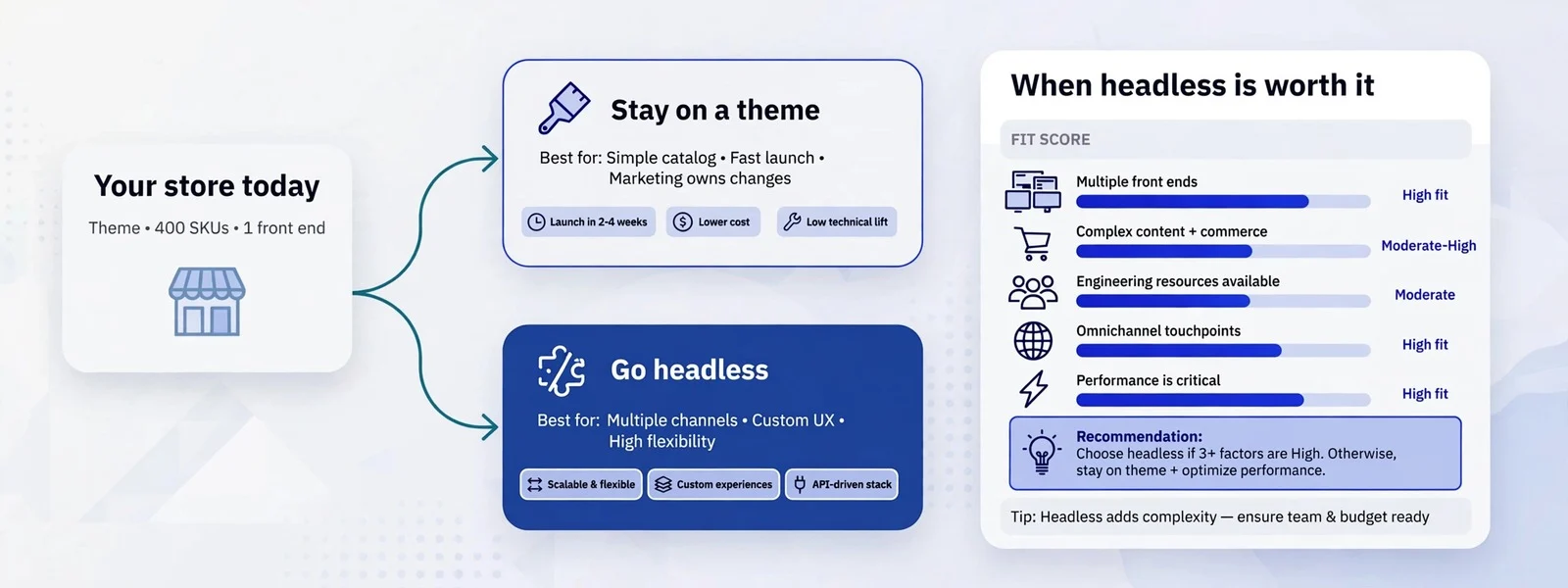
Headless commerce is worth it when your storefront has outgrown what a theme can do and you can afford a team to run what replaces it: content-heavy experiences, several storefronts on one catalogue, integrations a theme cannot host, or speed you cannot reach any other way. For most stores under that bar, a well-built theme on Shopify, BigCommerce or WooCommerce is faster to launch, cheaper to run and easier for marketing to edit.
We build headless storefronts, and we turn down more headless projects than we take. That is not modesty; it is what the numbers usually say once someone writes down the running cost next to the problem headless is meant to solve. This article is the framework we use on discovery calls: what headless actually changes, a scoring table you can fill in yourself, and the five situations where we tell people to keep their theme.
What “headless” actually changes
A headless store separates the front end (the pages customers see) from the commerce platform (catalogue, cart, orders, payments). The platform keeps doing the commerce; a separate application, usually built with a framework like Next.js, fetches products and content over an API and renders the pages.
On Shopify that API is the Storefront API; BigCommerce has a GraphQL Storefront API and documents its own headless options; WooCommerce exposes the Store API. In nearly every build we see, checkout stays on the platform: the custom front end builds a cart, then hands the buyer to the platform’s own checkout. Shopify’s documentation describes exactly that, a cart’s checkoutUrl that sends the buyer through Shopify’s web checkout.
Three things change for you as an owner:
- Who can change the storefront. On a theme, a merchandiser can add a section or install an app. On headless, most visual changes are code, unless the build includes a CMS or page builder that editors use.
- What apps can do. Many platform apps inject scripts or blocks into the theme. Those do not appear on a headless front end. You need the app’s API, a headless-ready alternative, or custom work.
- What you pay for every month. Hosting, monitoring, a CMS, and developer time for upgrades all become line items. We break those down in what headless actually costs to run.
The scoring table
Score each factor 0, 1 or 2 based on where your store is today, not where you hope it will be. Be honest about the team row; it decides more projects than any other.
| Factor | 0 points | 1 point | 2 points |
|---|---|---|---|
| Content and experience | Product and collection pages cover what you sell | Some landing pages and editorial the theme handles awkwardly | Content, configurators or interactive experiences are central to how you sell |
| Speed after tuning | Theme passes Core Web Vitals or could with fixes | Passes on some templates, fails on others after real effort | Fails after a serious optimisation pass and the cause is the theme architecture |
| Storefronts and integrations | One store, standard apps | Two or three storefronts or a PIM/ERP that the theme fights | Many brands, regions or channels sharing data; integrations a theme cannot host |
| Team | No in-house developer, no retainer | A retainer or part-time developer | Developers who will own a Next.js app and its upgrades |
| Budget for running cost | Theme-level spend only | Can fund hosting and a small retainer | Can fund hosting, monitoring, CMS and ongoing development |
| Roadmap | Mostly catalogue and promotions | A few features planned that strain the theme | A product roadmap that needs app-like features on the storefront |
How to read the total:
- 0–4: keep a theme. Spend the money on speed work, design and conversion.
- 5–8: try the cheaper routes first: a better theme, a headless CMS for content pages only, or a headless section such as a blog or lookbook on a subdomain or path.
- 9–12: headless is a reasonable investment, provided the team and budget rows scored at least 1 each. A high total with a zero in either of those rows is a warning sign, not a green light.
The thresholds are judgement, not science. We use them to start a conversation, and the conversation usually turns on one row.
Five situations where a theme wins
1. The real problem is apps, not the theme
Most slow stores we audit are slow because of third-party scripts: reviews, chat, pop-ups, tracking pixels, personalisation. Going headless does remove them, but so does deleting them or loading them later. If an audit shows that scripts are behind the slow templates, fix that first. Our LCP breakdown and speed optimisation work start there for that reason.
2. Marketing changes the storefront every week
If your merchandisers rearrange the home page, launch campaign pages and test banners every week without a developer, a theme editor is doing real work for you. Headless can give that back through a CMS with page building, but it is extra build effort and extra cost. If nobody is asking for something a theme cannot do, you would be paying to rebuild what you already have.
3. You have no one to own the code
A headless storefront is an application. Its framework releases new versions, its dependencies get security patches, and the platform APIs it calls are versioned and retired on a schedule (Shopify, for example, releases Storefront API versions on a regular cadence). Without an owner, a headless site ages faster than a theme. If the plan is “launch and leave it”, choose a theme.
4. The catalogue is simple and the budget is tight
A store with a straightforward catalogue, one market and a modest budget gets the most from a strong theme, good photography and fast pages. The headless premium (build and running cost, covered in our cost breakdown) is money not spent on stock, ads or conversion work.
5. You are about to change platform anyway
If you are moving from WooCommerce to Shopify, or from a legacy platform to BigCommerce, do the migration on a theme first. Changing platform and architecture at once doubles the risk to rankings and launch dates. Once the new platform is stable, headless becomes a separate, smaller decision. Our platform comparison covers the first decision.
When headless clearly pays off
The projects where headless has been worth it for our clients share a pattern:
- Content and commerce are one experience. Editorial, guides, configurators or lookbooks are how customers decide, and a theme forces them into templates that do not fit.
- Several storefronts share one source of truth. Multiple brands or regions draw on one catalogue or PIM, and keeping several themes in step costs more than one shared front end.
- The storefront needs app-like features. Account areas, B2B portals, subscriptions or tools that sit awkwardly inside theme sections.
- Speed is the bottleneck after tuning. The theme has been optimised and still fails on the templates that matter, for architectural reasons.
- There is a team. Someone, in-house or on retainer, owns the code after launch.
Once the decision is made, the next question is the stack. On Shopify that usually means Hydrogen versus Next.js on the Storefront API; on BigCommerce and WooCommerce, Next.js is the common choice.
Cheaper steps before going fully headless
A full headless rebuild is not the only alternative to doing nothing. In rough order of cost:
- Tune the theme. Remove unused apps, defer scripts, fix images and fonts. This alone solves most speed complaints.
- Rebuild the theme properly. A clean, section-based theme often fixes editing pain and speed at once. On Shopify, see our Shopify development work; on WooCommerce, WooCommerce development.
- Go headless for content only. Keep the store on its theme and move the blog, guides or landing pages to a Next.js front end with a CMS.
- Go headless for one storefront. Launch a new brand or region headless while the main store stays on its theme, and learn the running cost on a smaller surface.
- Go fully headless. Once the earlier steps show the benefit is real.
A checklist before you commit
- We have measured Core Web Vitals on our key templates with field data, not just a lab test (see web.dev on Core Web Vitals).
- We have listed every app on the store and know which ones have a headless-ready API.
- We know who will own the front end for the next two years.
- We have a 12-month running-cost estimate, not just a build quote.
- We know which pages editors change and how they will change them after launch.
- We have a redirect and SEO plan, because a headless launch is a migration for search engines (Google’s site move guidance applies if URLs change).
If you can tick all six, a headless storefront is a decision you can defend. If you cannot, the gaps tell you what to do first. Our headless ecommerce page sets out how we scope and run these builds, including when we recommend against them.